> ## Documentation Index
> Fetch the complete documentation index at: https://docs.jtbdos.com/llms.txt
> Use this file to discover all available pages before exploring further.

# Metabase

> How to add business intelligence and analytics to your app with Metabase.

export const Authors = ({data}) => {
  const baseUrl = typeof window !== 'undefined' && window.location.origin.includes('localhost') ? '' : 'https://raw.githubusercontent.com/haydenbleasel/JTBDOS/refs/heads/main/docs';
  return <div style={{
    marginBottom: '3rem',
    display: 'flex',
    flexDirection: 'column',
    gap: '0.5rem'
  }}>
      <span style={{
    color: 'rgb(107, 114, 128)',
    fontSize: '0.875rem'
  }}>Co-authored by</span>
      <div style={{
    display: 'flex',
    flexWrap: 'wrap',
    alignItems: 'center',
    gap: '0.5rem'
  }}>
        {data.map(author => <div key={author.name} style={{
    padding: '0.75rem',
    paddingRight: '1rem',
    display: 'inline-flex',
    alignItems: 'center',
    gap: '0.75rem',
    fontWeight: 'normal',
    position: 'relative',
    ringWidth: '2px',
    ringColor: 'transparent',
    borderRadius: '0.75rem',
    backgroundColor: 'white',
    border: '1px solid rgba(0,0,0,0.1)',
    overflow: 'hidden'
  }}>
            <div style={{
    position: 'relative'
  }}>
              <div style={{
    overflow: 'hidden',
    border: '1px solid #e5e7eb',
    borderRadius: '9999px',
    width: '2rem',
    height: '2rem'
  }}>
                <img style={{
    margin: 0,
    width: '100%',
    height: '100%',
    objectFit: 'cover'
  }} src={`${baseUrl}/images/authors/${author.company.id}/${author.user.id}.jpg`} alt="" width={32} height={32} />
              </div>
              <div style={{
    position: 'absolute',
    border: '1px solid white',
    overflow: 'hidden',
    borderRadius: '9999px',
    objectFit: 'cover',
    width: '1rem',
    height: '1rem',
    right: '-0.25rem',
    bottom: '-0.25rem'
  }}>
                <img style={{
    margin: 0,
    width: '100%',
    height: '100%',
    objectFit: 'cover'
  }} src={`${baseUrl}/images/authors/${author.company.id}/logo.jpg`} alt="" width={16} height={16} />
              </div>
            </div>
            <div style={{
    display: 'flex',
    flexDirection: 'column'
  }}>
              <span style={{
    fontWeight: 600,
    lineHeight: 1.25,
    fontSize: '13px',
    letterSpacing: '-0.01em'
  }}>
                {author.user.name}
              </span>
              <span style={{
    color: 'rgb(107, 114, 128)',
    lineHeight: 1.25,
    fontSize: '11px'
  }}>
                {author.company.name}
              </span>
            </div>
          </div>)}
      </div>
    </div>;
};

<Authors
  data={[{
user: {
name: 'Hayden Bleasel',
id: 'haydenbleasel',
},
company: {
name: 'JTBDOS',
id: 'JTBDOS',
},
}, {
user: {
name: 'Matthew Hefferon',
id: 'heffhq',
},
company: {
name: 'Metabase',
id: 'metabase',
},
}]}
/>

While JTBDOS does not come with BI tooling out of the box, you can easily add business intelligence and analytics to your app with [Metabase](https://www.metabase.com/).

## Overview

Metabase is an open-source business intelligence platform. You can use Metabase to ask questions about your data, or embed Metabase in your app to let your customers explore their data on their own.

## Installing Metabase

Metabase provides an official Docker image via Dockerhub that can be used for deployments on any system that is running Docker. Here's a one-liner that will start a container running Metabase.

```sh
docker run -d --name metabase -p 3000:3000 metabase/metabase
```

You can also install Metabase by running the JAR file. Links to different installations:

* [Quick Start](https://www.metabase.com/start/oss/)
* [Docker Documentation](https://www.metabase.com/docs/latest/installation-and-operation/running-metabase-on-docker)
* [Jar File Documentation](https://www.metabase.com/docs/latest/installation-and-operation/running-the-metabase-jar-file)

## Database Connection

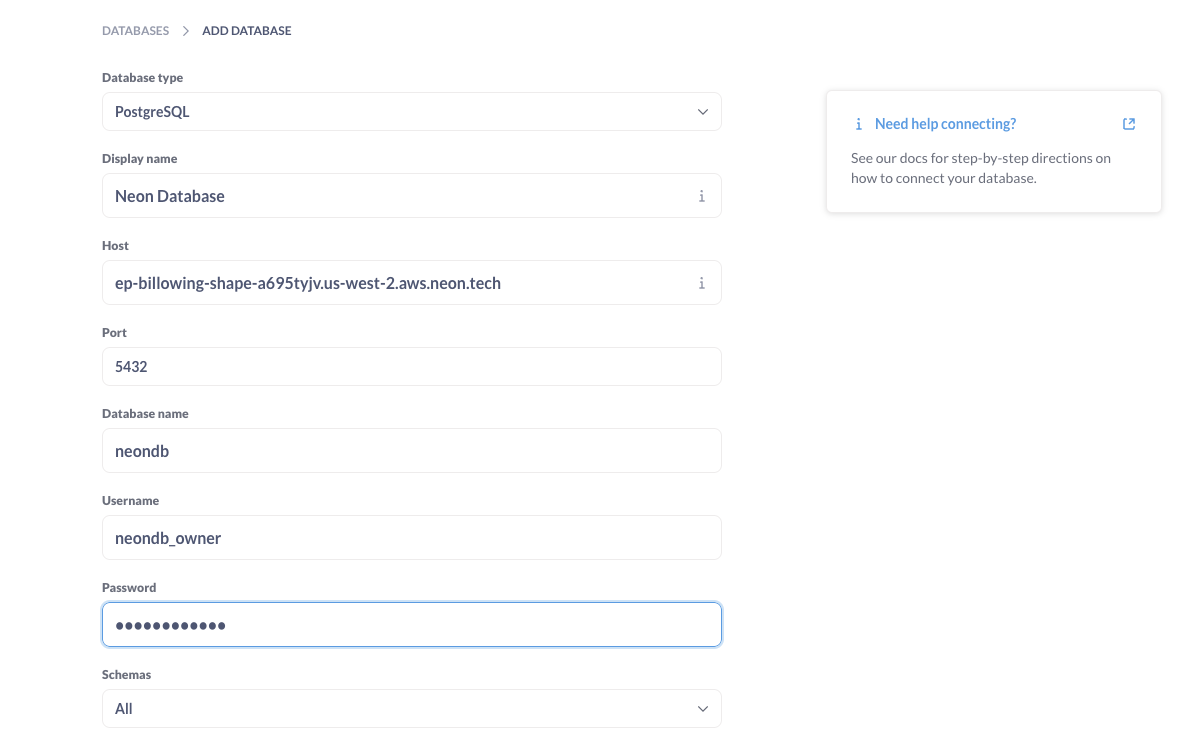
By default, JTBDOS uses Neon as its database provider. Metabase works great with Postgres databases so if you're ready to connect, here's what you'll need:

* The `hostname` of the server where your database lives
* The `port` the database server uses
* The `database name`
* The `username` you use for the database
* The `password` you use for the database

You can find these details in your `DATABASE_URL` environment variable:

```js
DATABASE_URL="postgresql://[username]:[password]@[hostname]:[port]/[database_name]?sslmode=require"
```

Next, plug your database connection credentials into Metabase:

<Frame>
  <img src="https://mintlify.s3.us-west-1.amazonaws.com/thrv-c7d92728/images/metabase-add-database.png" style={{ borderRadius: '0.5rem' }} />
</Frame>

Metabase supports over 20 databases. If you're working with a database other than postgres and want to integrate it, check out the [Metabase Database Documentation](https://www.metabase.com/docs/latest/databases/connecting).

## Asking Questions and building Dashboards

Now that you have installed Metabase, have database credentials, you can start asking [Questions](https://www.metabase.com/docs/latest/questions/query-builder/introduction) and building [Dashboards](https://www.metabase.com/docs/latest/dashboards/introduction).